naijafirmware Home of Android firmwares

Sunday, 24 March 2019

Download Android Pie 9.0 firmware for MECOOL KM9 TV Box

Download Android Pie 9.0 firmware for MECOOL KM9 TV Box

Posted in Mar 3, 2019 in Firmwares, 1 comment

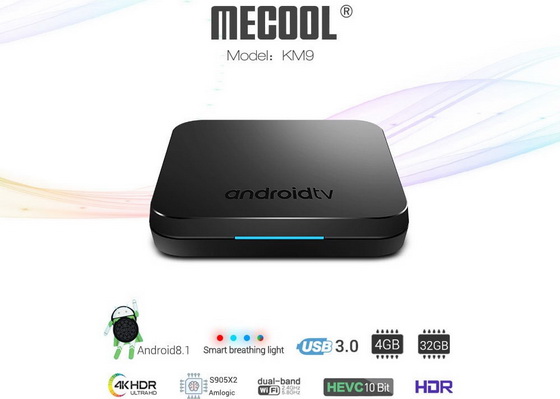
This firmware is for MECOOL KM9 TV Box with AMLogic S905X2 as CPU. BTW, you can buy MECOOL KM9 TV Box from Gearbest.com for a very good price.

Download Android Pie 9.0 firmware for MECOOL KM9 TV Box from here or here. Download Android Oreo 8.1 firmware for MECOOL KM9 TV Box  Download Amlogic USB Burning Tool v2.1.6 from here or download Amlogic Burn_Card_Maker v2.0.2 from here.
Firmware details
Archive name: KM9-PI-V1.20190107.175858_Beta_CGR
Image: KM9-PI-V1.20190107.175858.img
Archive file size: 860MB
Model: MECOOL KM9 TV Box
Platform: AMLogic S905x2
System: Android verson 9.0
Caution Please do not update firmware unless you know what you are doing, you really want it or it is absolutely necessary. Firmware updates may occasionally have bad results, like bricking your device, temporarily or permanently. The firmware update process is done entirely at your own risk. Before attempting to update the firmware, back up your data.

Did this article help you? If so, please tell me in a comment what do you think about it.

Download Android Jelly Bean 4.1.2 firmware for Galaxy Grand Duos GT-I9082i

Download Android Jelly Bean 4.1.2 firmware for Galaxy Grand Duos GT-I9082I

This firmware is for Galaxy Grand Duos GT-I9082i smartphone with Broadcom BCM28155 CPU


Galaxy Grand Duos GT-I9082i
Download Android Jelly Bean 4.1.2 firmware for Samsung Galaxy Grand Duos GT-I9082i smartphone from here or here.
Firmware details
Archive name: Galaxy Grand Duos GT-I9082I 4.1.2 fw
Firmware image: CHU-I9082iZNAMG2 / I9082iZNAMG2_I9082iCHUAMG2_I9082iZNAMG2_HOME.tar.md5
FW version: Android Jelly Bean 4.1.2 stock
Archive file size: 730 MB
Model: Samsung Galaxy Grand Duos GT-I9082i smartphone
Platform: Broadcom BCM28155


Caution: Please do not update firmware unless you know what you are doing, you really want it or it is absolutely necessary. Firmware updates may occasionally have bad results, like bricking your device, temporarily or permanently. The firmware update process is done entirely at your own risk. Before attempting to update the firmware, back up your data.

Did this article help you? If so, please tell me in a comment what do you think about it.


LEAGOO T5c 4G Smartphone First Impressions & Quick Review

Best Deal Alert! You can now buy LEAGOO T5c 4G Smartphone from Gearbest.com for only $124.04 with free shipping world wide.

LEAGOO T5c
Meet LEAGOO T5c 4G Smartphone
LEAGOO, as a global leading export brand, has recently launched its latest mid-range killer – LEAGOO T5c, planning to release the full potential of mid-range handsets to the fullest. What distinguishes LEAGOO T5c from other mid-range smartphones is that T5c features high-end specs and craftsmanship on its mid-range devices. LEAGOO T5c is the world’s first smartphone to be equipped with SC9853I SoC. Based on Intel’s 14nm FinFET process technology, SC9853I features 1.8GHz 64-bit octa-core Intel Airmont microarchitecture, which enables it to offer a high-performance mobile computing ability coupled with ultra-low power.
According to the official data from Spreadtrum, SC9853i is an octa-core chipset with 1.8Ghz frequency. The test result of Antutu benchmark shows that SC9853i is 39% stronger than MT6750 , in which the single-core performance and multi-core performance of SC9853i is 25% and 36% stronger than that of MT6750 respectively. Thanks to Intel’s 14nm FinFET technology, SC9853i’s power efficiency is also predominantly better than the 28nm MTK MT6750.
As a mid-range handset, T5c’s appearance is conventional but has many surprising features only seen on high-end or even flagship devices such as premium metal uni-body, 0.1s unlock front fingerprint ID and HD rear dual camera, etc. What’s more, T5c sports a front beauty softlight LED for its selfie camera, offering more bright and natural selfie pictures for its users.
Here you can read about the unboxing of LEAGOO T5c smartphone.
Next, watch the first impressions and the first experience on Android Nougat 7.0 OS
Firmware tested: Android Nougat 7.0
Build number: LEAGOO_T5c_OS2.1_E_20171217 / NRD90M
Kernel version:  LEAGOO T5c_OS2.1 / 4.4.49
Android Patch Level: November 5, 2017
Firmware version: LEAGOO_T5c_OS2.1_E_20171217
Hardware: k500_lgt_511
Board:  k500_lgt_511_vmm
API Level: 24
Java VM: ART 2.1.0
Root: Firmware is not rooted.
Available features: Dual SIM (Nano SIM + Nano SIM),  Radio FM, WiFi, WiFi Hotspot, Bluetooth 4.0,  A-GPS, GPS, Microphone, Front Camera & Dual Rear Camera, Front & Rear Camera Flash, USB Host, OTA Sync, Leagoo App Store, Scheduled Power On & Off, Printing, Voice Search, Sound Recorder, Calculator, FlashLight, Airplane Mode, App Widgets, Audio Jack Output, USB Accessory, OTG, Multitouch, NavigationBar, Audio Profiles, LED Light, Google Play Store & gapps, Adaptive brightness, Enhanced 4G LTE Mode, VoLTE Lock, Dual VoLTE Active, Tethering, Computer Sync, A2DP (Advanced Audio Distribution Profile), Fingerprint.
Sensors available on device: 36 sensors on board: Accelerometer, Light, Step Detector, Step Counter, Tilt detector, Device Orientation, Stationary Detect, Motion Detect, Accelerometer (WAKE-UP), Light (WAKE-UP), Proximity, Significant Motion, Step Detector (WAKE-UP), Step Counter (WAKE-UP), Tilt detector (WAKE-UP), Wake Gesture, Glance Gesture, Pick Gesture, Device Orientation (WAKE-UP), Stationary Detect (WAKE-UP), Face up & Down, Context awarness, Tap (WAKE-UP), Flip (WAKE-UP), Pocket Mode (WAKE-UP), Hand up (WAKE-UP), Hand down (WAKE-UP), Face up & Down (WAKE-UP), Context Awarness (WAKE-UP).
CPU & GPU
CPU: Spreadtrum SC9853I Intel Airmont (R) IA B145 1.87 GHz Octa Core. Architecture: x86.Technology: 14nm
GPU: ARM Mali-T860.
Cameras. Main Rear Camera: SAMSUNG S5K3L8 13.0MP AF, 5P lens. Sub Rear Camera: SP2509, 2.0MP 2P lens. Capture: 13M-4: 3 30FPS (3939Mbps). Front Camera:  GC5024,5MP FF, 4P lens F2.2 Aperture with Flash led. Enjoy Capturing!
Display. 5.5 inch SHARP FHD IPS Display. 1920*1080 403ppi Asahi glass (with anti-fingerprint oil). Scratch resistant. 2.5D curved glass screen 400 cd/m2. Capacitive. Color LED Notifications. Multi-touch. Viewing angle – 178°.
Battery. 3000 mAh Li-Ion. Fast Charging / Quick Charge. Non-removable.
Internal storage.   Capacity: 32 GB. Space without OS: 25.18 GB. Available Storage: 19.39 GB. (77%). SD slot up to 128 GB. Tested with  Mixza Tohaoll 64GB SDXC Micro SD Memory Card.
Cost-effective. 8.2 from 10 – pretty impressive regarding the actual low price.
In Antutu Benchmark 7.0.4 LEAGOO T5c achieves a very good score, about 64.000 points.
In Antutu Video Tester 3.0 LEAGOO T5c Phablet  scores 642 points, a fair score in this test ranking. This firmware version fully supports 13 video & audio format files, it partially supports 6 video & audio format files and doesn’t manage to play correctly 11 files types.
Wifi Internet speed tested gets also pretty good values: about 48 Mbps in download and the upload speed was also over 45 Mbps. The router used in this test is Xiaomi Mi WiFi Router, mounted in another room.
Conclusion
Android Nougat OS on the LEAGOO T5c Phablet runs very smooth – transitions, animations, apps switching and general OS fluidity is just great, I really like it a lot. During our tests, we experienced zero force closes, hangups or stability issues. Google Play and gapps are working without issue. Google Play Services updated no problem. 3rd party apps downloaded and updated without issues.
LEAGOO T5c Phablet has now an amazing affordable price and very good value for the money.
Photo gallery full album here. Official webpage here.
Leagoo smartphones related articles
1. Leagoo Alfa 2: Unboxing & Review.
2. Leagoo Kiicaa Mix: Unboxing & Review.
3. Leagoo M5: Unboxing & Review.
4. Leagoo M5 Plus: Unboxing & Review.
5. Leagoo M5 Edge: Unboxing & Review.
6. Leagoo M7: Unboxing & Review.
7. Leagoo M8: Unboxing & Review.
8. Leagoo M8 Pro: Unboxing & Review.
9. Leagoo T1: Unboxing & Review.
10. Leagoo T1 Plus: Unboxing & Review.
11. Leagoo T5: Unboxing & Review.
12. Leagoo Z1: Unboxing & Review.
13. Leagoo Z5: Unboxing & Review.
14. Leagoo S8: Unboxing & Review.
15. Leagoo Shark 1: Unboxing & Review.
16. Leagoo Shark 5000: Unboxing & Review.
17. LEAGOO T5c: Unboxing.
18. Leagoo Venture 1: Unboxing & Review.
      LEAGOO T5c LEAGOO T5c LEAGOO T5c LEAGOO T5c LEAGOO T5c LEAGOO T5c

About Leagoo LEAGOO is a star brand owned by Shenzhen OTEDA Technology Co., Ltd. In order to supply high quality smartphones and excellence using our wealth of previous experience, the OTEDA team – which relies on a proven track record in the mobile communications industry – set up a new smartphone brand called ‘LEAGOO’ in April 2014. With our Research & Development expertise and supply chain resources, the OTEDA team has spared no effort in building LEAGOO into a well-kno

Download Android 6.0.1 firmware for Nexus 6 smartphone

Download Android 6.0.1 firmware for Nexus 6 smartphone


This firmware is for Nexus 6 smartphone with Qualcomm Snapdragon 805 as CPU.

Nexus 6
Download Android 6.0.1 firmware for Nexus 6 smartphone from here, here or here.

Freeme OS Firmware details
Archive: Nexus 6 Flyme 6.7.11.3IR beta
OS: Flyme 6.7.11.3IR beta based on Android Marshmallow 6.0.1
Image file size: 732 MB
Platform: Qualcomm Snapdragon 805
Image: flyme_Nexus-6_ddfzl_6.7.11.3IR-beta
Build number: shamu-user 6.0.1 MOB31T builder.20171107180722_R test-keys

Changelog
Optimizing Flyme& underlying system framework.
Update Flyme voice assistant database.
Updated some system apps to latest version.
Synced source code for Flyme6 to latest.

Caution: Please do not update firmware unless you know what you are doing, you really want it or it is absolutely necessary. Firmware updates may occasionally have bad results, like bricking your device, temporarily or permanently. The firmware update process is done entirely at your own risk. Before attempting to update the firmware, back up your data.

Did this article help you? If so, please tell me in a comment what do you think about it.


Download Android 6.0.1 firmware for OnePlus 3 smartphone

Posted in Apr 30, 2018 in Firmwares, no comment

This firmware is for OnePlus 3 / 3T smartphone with Qualcomm Snapdragon 820 as CPU. You can buy it from Gearbest.com for a very good price.


Download Android 6.0.1 firmware for OnePlus 3 / 3T smartphone from here, here or here.

Freeme OS Firmware details
Archive: OnePlus 3 – 3T Flyme 6.7.10.9IR beta
OS: Flyme 6.7.10.9IR beta based on Android Marshmallow 6.0.1
Image file size: 943 MB
Platform: Qualcomm Snapdragon 820
Image: flyme_ONEPLUS-A3010_xs_6.7.10.9IR-beta
Build number: -user 6.0.1 MXB48T builder.20171013115456_R dev-keys


Changelog
power management settings open multiple-choice questions.
Updated some system apps to latest version.
Synced source code for Flyme6 to latest.
Caution: Please do not update firmware unless you know what you are doing, you really want it or it is absolutely necessary. Firmware updates may occasionally have bad results, like bricking your device, temporarily or permanently. The firmware update process is done entirely at your own risk. Before attempting to update the firmware, back up your data.

Did this article help you? If so, please tell me in a comment what do you think about it.

Download Android Nougat 7.1.1 firmware for ZTE Nubia Z17 Lite 4G Phablet


Download Android Nougat 7.1.1 firmware for ZTE Nubia Z17 Lite 4G Phablet


This firmware is for ZTE Nubia Z17 Lite 4G Phablet with Qualcomm Snapdragon 653 as CPU. You can buy Nubia Z17 Lite 4G Phablet from Gearbest.com for only $243.38 with free shipping world wide.

Nubia Z17 Lite
Download Android Nougat 7.1 firmware for Nubia Z17 Lite 4G Phablet from here, here or here. Download previous firmware from here.
Firmware details
Archive: NX591-update / ZTE Nubia Z17 Lite 5.5 Inch Smartphone Firmware Updated 20180831
Model: Nubia Z17 Lite 4G Phablet
Image file size: 2.08 GB
Platform: Qualcomm Snapdragon 653
Image: NX591-update.zip
Build number: nubia/NX591J/NX591J:7.1.1/NMF26F/eng.nubia.20180129.194858:user/release-keys
timestamp=1517226538
pre-device=NX591J

Caution: Please do not update firmware unless you know what you are doing, you really want it or it is absolutely necessary. Firmware updates may occasionally have bad results, like bricking your device, temporarily or permanently. The firmware update process is done entirely at your own risk. Before attempting to update the firmware, back up your data.

Did this article help you? If so, please tell me in a comment what do you think about it.

Download Android 7.1.2 firmware for Meizu M8C Smartphone

Download Android 7.1.2 firmware for Meizu M8C Smartphone

Posted in Jun 30, 2018 in Firmwares, no comment

This firmware is for Meizu M8C Smartphone with Qualcomm MSM8917 Snapdragon 425 as CPU.

Meizu M8C
Download Android 7.1.2 firmware for Meizu M8C Smartphone from here, here or here.

Firmware details
Archive name: Meizu M8c Flyme 6.3.5.1G
FW version: Flyme 6.3.5.1G based on Android Nougat 7.1.2
Archive file size: 1.39 GB
Model: Meizu M8C Smartphone
Image: update.zip
Platform: Qualcomm MSM8917 Snapdragon 425
Build number: Meizu_M8c-user 7.1.2 N2G47H 1524725908 release-keys

Changelog
• Solved the high power usage issue when on standby;
• Fixed bug — crash down when playing video files;
• Fixed bug — when the sound card is unplugged, tap the play button and playing music fails;
• Fixed bug — when set the multi-task cards to display in vertical layout, the icon for freeing up memory is missed on the multi-task interface;
• Fixed bug — fails to make the emergency call 104 on the PIN or lock screen interface;
• Fixed bug — fails to make the emergency call 199/191/192 when on the PIN or lock screen interface, or when the phone is with no SIM card;
• Fixed bug — in the professional mode of the camera, set exposure time to 1 second or longer, there is a several-second time lag when the countdown shutter ended;
• Fixed bug — in the professional mode of the camera, set exposure time to 8 seconds and tap to shoot; then set the exposure time to any length and tap to shoot, the camera app crashes;
• Fixed bug — when smart network switch is enabled, it cannot switch the unavailable AP to the available AP automatically;
• Fixed bug — when the phone language is Turkish or Azerbaijani and there is no photo in gallery, take a photo and view it, then a flashback to camera interface occurs;
• Fixed bug — when taking photos by the front camera of Snapchat, the preview interface is all in green;
• Optimized system stability;
• Fixed bug — when Smartfren card is plugged, “2G only” option appears in the network mode;
• Fixed bug — when dual cards enabled, set Intertelecom as the secondary card and then set it back to the main card, network connection fails;
• Updated languages.


Caution: Please do not update firmware unless you know what you are doing, you really want it or it is absolutely necessary. Firmware updates may occasionally have bad results, like bricking your device, temporarily or permanently. The firmware update process is done entirely at your own risk. Before attempting to update the firmware, back up your data.

Did this article help you? If so, please tell me in a comment what do you think about it.

Xiaomi Pocophone F2, equipped with SD 855 and Android Q

Xiaomi Pocophone F2, equipped with SD 855 and Android Q

Posted in Mar 21, 2019 in Smartphones, no comment

Xiaomi Pocophone F1 (known as Poco F1 in India) was released in August last year, making it the cheapest Snapdragon 845 mobile phone ever (about $298). Now, the benchmark score of the new generation of Pocophone F2 appears on the Geekbench.

The benchmark score data of the new Pocophone F2 looks a little strange, with only 4 GB of memory on board, compared with 6 GB RAM for the previous generation of Phone F1. Secondly, although the motherboard of the machine is shown as “msmnile”, which means that it is equipped with the snapdragon 855 mobile platform. The running score shows that the single-core score of the phone is 1776. The multi-core score is 6097, and there is a big gap between the multi-core running score of the phone and the tens of thousands of other snapdragon 855 mobile phones.
The running score data also show that Pocophone F2 will carry the Android Q operating system, but when it is officially released, it may still be pre-installed with Android 9 Pie and updated later.
Some foreign media believe that this running score data may not correctly reflect the performance of the snapdragon 855. From these data, we can see that the Pocophone F2 may still be in the engineering testing stage, and we should be able to get more details about the new Pocophone phone in the future.


Did this article help you? If so, please tell me in a comment what do you think about it.

Sunday, 24 February 2019

Vivo E3 Firmware (Stock ROM)


    Vivo E3 Firmware (Stock ROM)


    Package Name: Vivo_E3_MT6575_ALPS.ICS.MP.V2_4.0.4.zip
    How to Flash: Follow Guidelines
    Package Size: 464 MB
    Firmware Link: Click Here to Get the Firmware

    How to Flash Vivo E3 Firmware (Stock ROM)

    Step 1: Download and Extract the Vivo E3 Firmware Package on the Computer.

    Step 2: Once you have successfully extracted the firmware Package, you will be able to get the Flash File, Flash Tool, IMEI Tool, Driver and How-to Flash Manual.

    Step 3: Now, Install the provided CDC or VCOM USB Driver on the Computer.

    Step 4: Once you have successfully installed the USB Driver, Open SP Flash Tool on the Computer.

    Step 5: Once the SP Flash Tool is Launched, Connect your Vivo Smartphone to the Computer by using the USB Cable.

    Step 6: Now, Click on the Download or Upgrade Button in the SP Flash Tool to begin the Flashing process.

    Step 7: Once the flashing is completed, you will see a Green Tick at the End.

    Step 8: Now, Disconnect your Vivo E3 Smartphone from the Computer and Restart it.

    Readme:

    [*] SP Flash Tool: If you wish, you can download the latest version of SP Flash Tool from SP Flash Tool for Windows or SP Flash Tool for Linux page.

    [*] Backup: We recommend you to take a backup of your personal data from the device, before flashing or writing the Stock Firmware or IMEI because flashing the stock firmware or IMEI may permanently delete your personal data from the device.

    Caution: We do NOT recommend you to flash the preloader.bin file on the Vivo Devices powered by Mediatek Chipsets. As it may brick the device, therefore we recommend you to untick the preloader before flashing it using the SP Flash Tool.


Vivo_E3_MT6575_ALPS.ICS.MP.V2_4.0.4.zip

Friday, 25 January 2019

TECNO I3 STOCK FIRMWARE DOWNLOAD-NAIJAFIRMWARE

Tecno F4 Pro General Information AND Firmware

general vendor
Device Manufacturer
Tecno
String
general model
Model Name
F4 Pro
String
general aliases
Additional names this device is known by
Tecno Pop 1S Pro
String CSV (most common name first)
general type
Device type
Mobile
String (eg Tablet, Mobile, Computer etc..)
general battery
Battery Information
Li-Po 3000 mAh
String CSV
general cpu
CPU and Chip information
MediaTek MT6739WA, Quad Core, 1.28GHz, ARM Cortex A53, ARM Mali-400 MP2
String CSV
general eusar
Device SAR measured at head

String
general platform
Operating system name
Android
String
general platform version
Operating system version initially shipped with the device
8.1
String
general platform version max
Highest supported operating system version


  • Tecno i3 (i3-H375C1-N-180120V25)

  • https://mega.nz/#!NWpjgbTI!tXeioDjO3MEkujUvbTF-KiBvlzoeIb0EWMw7p5_9lvs

    Tecno i3 (i3-H375C1-N-IN-180131V300)
     https://mega.nz/#!cf4jHD6Z!VeQGhw3xQgDKfDsB26UHVtw2wSXFSJvlfVsKl6QlNHI

     Tecno i3 (i3-H375C1-N-IN-171013V240)
     https://mega.nz/#!Ai53SLjJ!MFnGQgAaBuoEzDUWEbx2PV2GLfZfx9Pjd7OiUWeRLHY


     Tecno i3 (i3-H375A1-N-IN-161221V28) 
     https://mega.nz/#!M3RS3RID!Q0lgfQ5Cpuj0Qi-EXMxlKySl7VFwGy9ruO9g9Ga5aNQ

     Tecno i3 Pro (i3Pro-H375D1-N-IN-170222V48) 

     https://mega.nz/#!M3RS3RID!Q0lgfQ5Cpuj0Qi-EXMxlKySl7VFwGy9ruO9g9Ga5aNQ


     Tecno i3 Pro (i3Pro-H375D1-N-IN-180211V297)
     https://mega.nz/#!2SpRmTCA!21J06WWJcgEZGyQD_wiCqduJ55090lizwDx1iO6W8EI

     Tecno i3 Pro (i3Pro-H375D1-N-IN-170504V100)
     https://mega.nz/#!rexXXZhZ!NdIyq-hS3x-JzCEyeDO8w287fsmYpoArXc9xHDYxmU4


    Sunday, 13 January 2019

    Nokia Update : No more easy EDL or cables

    Nokia Update : No more easy EDL or cables


    According CVE/ALEPH vulnerabilities and ostla leaks to hamsters, Nokia, with latest security updates CLOSED all EDL ways, used before ( EDL cable and SW way, used in BEST for Nokia 2/5/6/8 )

    From now on it uses RSA-2048 server signature verification.

    So, until that not implemented in BEST ( ETA - unknown for now ) - you MUST use TESTPOINT.
    Nokia 8 will be supported till 1st Febrary 2018 patch (include it) !

    Nokia 2 TP is easy. Can be performed with base tech skills ( i.t. remove screws and shields )
    Nokia 5-6 TP is a bit difficult. Need have skills in device disassemble.
    Nokia 8 TP is EXTRA hard - Don't try it at all. You will broke VERY thin touch panel or lcd, or damage device cooling system.

    Infinity Nokia [BEST] v2.29 - MTK Nokia Firmware Reader/Maker and more

    Infinity Nokia [BEST] v2.29 - MTK Nokia Firmware Reader/Maker and more


    Infinity Nokia [BEST] v2.29 - MTK Nokia Firmware Reader/Maker and more

    - MTKx Flash Engine updated
    Automatic "Repair Mode" enable, if device have damaged ROM
    Infinity ( Factory-Like ) FW flashing support

    - xCNT tool updated
    MediaTek tab activated
    Allow make firmware for MTK phones from read dump

    Supported lines:
    Nokia 108: RM-944, RM-945, RM-1124
    Nokia 220: RM-969, RM-970, RM-971, RM-1125
    Nokia 225: RM-1011, RM-1012, RM-1043
    Nokia 130: RM-1035, RM-1036, RM-1037, RM-1122
    Nokia 215: RM-1110, RM-1111, RM-1112
    Nokia 105: RM-1133, RM-1134, RM-1135
    Nokia 222: RM-1136, RM-1137
    Nokia 230: RM-1172, RM-1173
    Nokia 216: RM-1187, RM-1188
    Nokia 150: RM-1189, RM-1190

    Result FW is like factory one, which contain all need part to complete reflash or langpack change.

    Older models below Nokia 105 are supported as backward compatibility. Almost not required to use.
    Main use:
    1. Make firmwares for HMD phones which are NOT available YET!
    2. MTKx Legacy/HMD models problem solution: read FW from HMD devices (sw11 and newer)
    Optional use: Make firmwares with required LANGPACK which are NOT available YET!

    - Service operations revised
    MTKx: FlahIC detection on flash read improved for some devices
    MTKx: Dump reading more faster now
    NXP: HW revision verification has made problems for some rare X+ and XL+ models, fixed

    - Other
    Some bugfixes and improvements at all

    MTKx Legacy/HMD models:
    Those phones may have 2 version of firmware (old and new sec)
    Nokia 150 (it has legacy and hmd version)
    Nokia 105, Nokia 130, Nokia 216, Nokia 222, Nokia 230: probably two versions are available
    CS problem after flashing may be a result of flashing different version. Just reflash to another one ( SW10: LEGACY, SW11 and newer: HMD )

    Lumia/Nokia:
    MS will CLOSE WHOLE Windows Mobile support at June 2017.
    What will be with servers with firmwares - no one knows, but MS politic is simple - close and forget!
    If you have chance, free drive space and good inet: DOWNLOAD ALL NEED FIRMWARES!
    There will be NO newer versions anymore other than existing ones.


    Download link #1 - Download link #2 - Download link #3


    Upload file to Support - Download files via Torren

    Infinity-Box [BEST] NK2 v1.09 - FP Forensic and other features

    Infinity-Box [BEST] NK2 v1.09 - FP Forensic and other features


    Infinity-Box [BEST] NK2 v1.09 - FP Forensic and other features

    - Forensic engine for MTK feature line devices rebuild from scratch
    Allow extract phonebook memory from alive/dead/semi-dead devices
    From now allow extract phonebook from memory dump ( made by external prommer or older BEST versions )
    > Press and hold SHIFT key before press "Extract PhoneBook" button for enable File mode
    Extraction is direct (from device) and from dump
    Support unicode

    All existing MTK FP models are supported now for PhoneBook extraction:
    Nokia 108: RM-944, RM-945, RM-1124
    Nokia 220: RM-969, RM-970, RM-971, RM-1125
    Nokia 225: RM-1011, RM-1012, RM-1043
    Nokia 130: RM-1035, RM-1036, RM-1037, RM-1122
    Nokia 215: RM-1110, RM-1111, RM-1112
    Nokia 105: RM-1133, RM-1134, RM-1135
    Nokia 222: RM-1136, RM-1137
    Nokia 230: RM-1172, RM-1173
    Nokia 216: RM-1187, RM-1188
    Nokia 150: RM-1189, RM-1190
    Nokia 3310(2G): TA-1008, TA-1030
    Nokia 105(2017) : TA-1010, TA-1034, TA-1037
    Nokia 130(2017) : TA-1017, TA-1019

    - Changes/Fixes
    > MTK FP line
    Fix/Change: Flash engine revised
    New feature: SW version check during flashing activated. SW will verify data between phone and VPL.
    > In case of device dead ( no SW version data available ) - SW will warn about it.
    New feature: Complete language info during FlashFile selection ( will show all existing languages without need of manual flashing and verify )

    > MTK SP line
    Fix/Change : Flash engine revised
    Fix/Change : Repartition may fail during NK1 flashing, fixed


    Download link


    Subscribe to Telegram channel and get news faster !


    How to upload files to support

    Infinity-Box 13 years (2005 - 2018) updates and support as nobody else - News

    Twitter - Facebook - Telegram
    Report Post  

    Infinity team is proud to bring to you Samung Exynos phones Unlock service

    Infinity team is proud to bring to you Samung Exynos phones Unlock service


    Infinity Online Services !
    [B]Infinity team is proud to bring to you Samung Exynos phones Unlock service

    Special Promotion price ( 1 unlock = 5 Infinity credits any phone )

    • All Samsung Exynos phones supported ( accept S9 )
    • Latest 2018 firmware supported too after downgrade modem ( 6 seconds )
    • Fasted unlock time in market
    • Very special price for bulk clients contact me on skype : kashan.aslam2
    • Easy unlock method Read log, Upload log to server and get unlock code
    • Phone warranty and data is not touched
    • Permanent unlock code
    • working 24/7

    Infinity Online Services and Infinity Team is proud to bring you Samung Qualcomm phones Unlock service !

    Infinity Online Services and Infinity Team is proud to bring you Samung Qualcomm phones Unlock service !


    Where to find this service ?

    Login to your Infinity Online services account
    Go to Products > Unlock codes & Services > Samsung Qualcomm unlock code


    Supported models:

    • SM-G386F
    • SM-G386
    • SM-G386U
    • SM-G386W
    • SM-G360A
    • SM-G3608
    • SM-G360F
    • SM-J3109
    • SM-J3109
    • SM-J3110
    • SM-J7109
    • SM-P355
    • SM-P355C
    • SM-P355M
    • SM-P355Y
    • SM-P355B
    • SM-P355N
    • SM-P355K
    • SM-P555
    • SM-P555C
    • SM-P555M
    • SM-P555Y
    • SM-P555N
    • SM-P555K
    • SM-P555L
    • SM-P555S
    • SM-P605
    • SM-P605M
    • SM-P605L
    • SM-P605K
    • SM-P605S
    • SM-P905M
    • SM-P905F0
    • SM-P905V
    • SM-P907A
    • SM-G710
    • SM-G720N0
    • SM-G357FZ
    • SM-G870F
    • SM-G870W
    • SM-G720A
    • SM-N9200
    • SM-G920V
    • SM-G920P
    • SM-G920Rx
    • SM-G925V
    • SM-G925P
    • SM-G925Rx
    • SM-G928P
    • SM-G928Rx
    • G3502L
    • G3502
    • G3508J
    • G3509I
    • G3518
    • G3559
    • G3586V
    • G3589W
    • SM-G7106
    • SM-G7108
    • SM-G7108V
    • SM-G7109
    • SM-G9208
    • SM-G9209
    • SM-G9250
    • SM-G9280
    • SM-G9298
    • SM-G5520
    • SM-G890A
    • SM-G930P
    • SM-G930R4
    • SM-G930R6
    • SM-G930R7
    • SM-G930VL
    • SM-G7202
    • SM-G5700
    • SM-G750H
    • SM-G360P
    • SM-G360FY
    • SM-G3606
    • SM-G5306
    • SM-G5308
    • SM-G5309
    • SM-G360V
    • SM-G360R6
    • SM-C501X
    • SM-C900X
    • SM-G1650
    • SM-G600F
    • SM-G600FY
    • SM-G600S
    • SM-G6000
    • SM-G800F
    • SM-G800H
    • SM-G800HQ
    • SM-G800M
    • SM-G800Y
    • SM-G800R4
    • SM-G850A
    • SM-G850W
    • SM-G8508
    • SM-G8508S
    • SM-G860
    • SM-G860P
    • SM-G7200
    • SM-G7105
    • SM-G7102
    • SM-G9200
    • SM-E7000
    • SM-J5009
    • SM-A3000
    • SM-A3009
    • SM-A5009
    • SM-E700M
    • SM-A300F
    • SM-A300FU
    • SM-A300FN
    • SM-A300H
    • SM-A300M
    • SM-A300Y
    • SM-A300YZ
    • SM-A300G
    • SM-E500F
    • SM-E500H
    • SM-E500Y
    • SM-E500M
    • SM-E700F
    • SM-E700H
    • SM-E7009
    • SM-J500F
    • SM-J500FN
    • SM-J500G
    • SM-J500H
    • SM-J500M
    • SM-J327
    • SM-J327R4
    • SM-J327R6
    • SM-G9198
    • SM-G530FQ
    • SM-G530R4
    • SM-G530R7
    • SM-G530MU
    • SC-01J
    • SC-02F
    • SC-02G
    • SC-03G
    • SC-01H
    • SC-05G
    • SC-T21
    • SM-A5000
    • SM-A500F
    • SM-A500F1
    • SM-A500FQ
    • SM-A500FU
    • SM-A500G
    • SM-G900A
    • SM-G900AZ
    • SM-G900F
    • SM-G900T
    • SM-G900T1
    • SM-G900T2
    • SM-G900T3
    • SM-G900FD
    • SM-G900I
    • SM-G900L
    • SM-G900M
    • SM-G900MD
    • SM-G9006W
    • SM-G9008W
    • SM-G9009W
    • SM-G9009D
    • SM-G901F
    • SM-A500H
    • SM-A500HQ
    • SM-A500K
    • SM-A500L
    • SM-A500Y
    • SM-A500YZ
    • SM-A500XZ
    • SM-A500M
    • SM-A500S
    • SM-A500W
    • SM-A5100
    • SM-A7000
    • SM-C7010
    • SM-A7100
    • SM-A8000
    • SM-A9000
    • SM-A9100
    • SM-A910F
    • SM-G930AZ
    • SM-J320N0
    • SM-J320Y
    • SM-J320YZ
    • SM-J100VPP
    • SM-J3300
    • SM-J320ZN
    • SM-J5108
    • SM-J510F
    • SM-J510FN
    • SM-J5007
    • SM-J5008
    • SM-J510FQ
    • SM-J510GN
    • SM-J510H
    • SM-J510K
    • SM-J510L
    • SM-J500M
    • SM-J500N0
    • SM-J500Y
    • SM-J510MN
    • SM-J510S
    • SM-J510UN
    • SM-J727V
    • SM-J727VPP
    • SM-G6100
    • SM-J3110
    • SM-J3119
    • SM-C9008
    • SM-C900Y
    • SM-J327V
    • SM-J327VPP
    • SM-G1600
    • SM-N9300
    • SM-N930A
    • SM-N930W8
    • SM-N930R4
    • SM-N930R6
    • SM-N930R7
    • SM-W2017
    • SM-W2018
    • SM-J320VPP
    • SM-J320V
    • SM-J3119S
    • SM-J3308
    • SM-G892A
    • SM-G892U
    • SM-G5528
    • SM-G3609
    • SM-G360AZ
    • SM-G386
    • SM-G386W
    • SM-G360B
    • SM-G360F
    • SM-G360FY
    • SM-G360G
    • SM-G360GY
    • SM-G360M
    • SM-G360
    • SM-G5108
    • SM-G5109
    • SM-G5306W
    • SM-G5308W
    • SM-G5309W
    • SM-G530A
    • SM-G530AZ
    • SM-J7008
    • SM-G530BT
    • SM-G530F
    • SM-G530FZ
    • SM-G530H
    • SM-G530M
    • SM-G530
    • SM-G530W
    • SM-C5000
    • SM-C5010
    • SM-C5018
    • SM-C7000
    • SM-A7009
    • SM-G5510
    • SM-G891A
    • SM-G9300
    • SM-G9308
    • SM-G930A
    • SM-C9000
    • SM-G955W
    • SM-G9350
    • SM-G935A
    • SM-G9500
    • SM-G9508
    • SM-C7018
    • SM-G950U
    • SM-G950U1
    • SM-G950W
    • SM-G9550
    • SM-G9558
    • SM-G955U
    • SM-G955U1
    • SM-G530Y
    • SM-G6000
    • SM-G600FY
    • SM-G7508
    • SM-G7509
    • SM-C900F
    • SM-J320R4
    • SM-G935R4
    • SM-G935U
    • SM-G870A
    • SM-T237
    • SM-T321
    • SM-T325
    • SM-T335
    • SM-T335L
    • SM-T335K
    • SM-T337
    • SM-T337A
    • SM-T337W
    • SM-T355
    • SM-T355C
    • SM-T355Y
    • SM-T357A
    • SM-T357W
    • SM-T365
    • SM-T365M
    • SM-T365N
    • SM-T365Y
    • SM-T365F0
    • SM-T385
    • SM-T385C
    • SM-T385M
    • SM-T385N
    • SM-T385D
    • SM-T525
    • SM-T535
    • SM-T537A
    • SM-T555
    • SM-T555C
    • SM-T555Y
    • SM-T567
    • SM-T587
    • SM-T719
    • SM-T719C
    • SM-T719Y
    • SM-T818
    • SM-T818A
    • SM-T818T
    • SM-T818V
    • SM-T818W
    • SM-T819
    • SM-T819C
    • SM-T819Y
    • SM-T825
    • SM-T825C
    • SM-T825Y
    • SM-T827
    • SM-T905
    • SCV31
    • SCV33
    • SCV34
    • SCV37
    • SC-04G
    • 403SC
    • 404SC
    • SC-02H
    • SC-02J
    • SC-03H
    • SC-03J
    • SC-01K
    • SM-N950W
    • SM-N950U
    • SM-N950U1
    • SM-N950UX
    • SM-N9500
    • SM-N9508
    • SM-J250F
    • SM-J250G
    • SM-J250M
    • SM-J250N
    • SM-J3119S

    IMPORTANT: T-Mobile USA is not supported which require APP unlock !


    Contact: sales@infinity-box.com


    More unlock services: Infinity team is proud to bring to you Samung Exynos phones Unlock service


    Infinity-Box 13 years (2005 - 2018) updates and support as nobody else - News

    Twitter - Facebook - Telegram

    Chinese miracle2 not opening M2MT2 2.03 not openning solution here

    M2MT2 2.03 not openning solution here


    for users who can not start new version M2MT2 2.03 you need do this :

    delete file named : FSCard.ini

    or just replace it with this

    FSCard.zip

    Infinity Chinese Miracle-2 QLM v1.16 - Lot of new models and features

    Infinity Chinese Miracle-2 QLM v1.16 - Lot of new models and features


    Infinity Chinese Miracle-2 QLM v1.16 - Lot of new models and features

    New CPU support
    Qualcomm MSM 8905 (Mobile Platform 205)
    Qualcomm MSM 8609 (SnapDragon 210)
    Qualcomm MSM 8953 (SnapDragon 625 pro)

    Supported CPU List:
    Qualcomm MSM 8210 (SnapDragon 200)
    Qualcomm MSM 8212 (SnapDragon 200)
    Qualcomm MSM 8610 (SnapDragon 200)
    Qualcomm MSM 8612 (SnapDragon 200)
    Qualcomm MSM 8226 (SnapDragon 400)
    Qualcomm MSM 8626 (SnapDragon 400)
    Qualcomm MSM 8926 (SnapDragon 400)
    Qualcomm MSM 8228 (SnapDragon 400)
    Qualcomm MSM 8628 (SnapDragon 400)
    Qualcomm MSM 8928 (SnapDragon 400)
    Qualcomm APQ 8009 (SnapDragon 210)
    Qualcomm MSM 8209 (SnapDragon 210)
    Qualcomm MSM 8609 (SnapDragon 210)
    Qualcomm MSM 8905 (Mobile Platform 205)
    Qualcomm MSM 8909 (SnapDragon 210)
    Qualcomm MSM 8916 (SnapDragon 410)
    Qualcomm MSM 8917 (SnapDragon 425)
    Qualcomm MSM 8929 (SnapDragon 415)
    Qualcomm MSM 8936 (SnapDragon 610)
    Qualcomm MSM 8937 (SnapDragon 430)
    Qualcomm MSM 8939 (SnapDragon 615)
    Qualcomm MSM 8940 (SnapDragon 435)
    Qualcomm MSM 8974/A/AA/AB (SnapDragon 801)
    Qualcomm MSM 8952 (SnapDragon 617)
    Qualcomm MSM 8953 (SnapDragon 625/pro/plus)
    Qualcomm MSM 8956 (SnapDragon 650)
    Qualcomm MSM 8976 (SnapDragon 652)
    Qualcomm MSM 8976 Pro (SnapDragon 653)
    Qualcomm MSM 8992 (SnapDragon 808)
    Qualcomm MSM 8994 (SnapDragon 810)
    Qualcomm MSM 8996 (SnapDragon 820)
    Qualcomm MSM 8996 Pro (SnapDragon 821)
    Qualcomm MSM 8998 (SnapDragon 835)

    - Main
    FH Protocol updated and revised
    Core revised, no more stuck boot problems
    MSM8953 Pro new revision supported
    MSM8905 supported
    MSM8609 supported
    Test support: SDM660
    Test support: SDM630

    - Flasher
    SafeRegions detection improved
    Factory firmware handling optimized

    - More Secure and Generic types supported
    +50 UNIQUE loaders included in internal DB!
    Now QLM cover 230+ UNIQUE SECURE AND GENERIC TYPES! As nobody else
    Software DO NOT require any kind of manual loaders selection, bruteforce etc.
    MSM8909: ZTE, Asus, Alcatel and some Oppo
    MSM8916: Coolpad, Alcatel and some Oppo
    MSM8976: Vivo and others
    MSM8953: Vivo and others
    MSM8956: Generic Secure Chinese types, Alcatel, Lenovo and some others
    MSM8936: Cover more Cyanogen based models ( include WileyFox and some rest )
    MSM8937: Asus and other secure types
    MSM8998: Nokia 8, and other Xiaomi models
    MSM8905: Generic, LYF and other secure types

    - Service operations improved
    Enabled QCN operations
    - Allow read calibrations and secure memory in XQCN format
    - Allow write calibrations and security memory in XQCN format
    - QCN verify, automatic security field update
    Enabled Security repair feature
    - Default "Clean memory mode" for start. Use with backup, wipe and restore
    Basic DiagInfo reading during Diag operations
    ADB layer activated
    Enable Diag mode option released
    - Allow enable diagnostic port on device [ ROOT REQUIRED! ]

    - Firmware Reader engine updated
    A/B memory architecture supported - allow read FW from newer devices with Android A/B update system!
    New types supported ( brand-specific and generic types )
    Files verification revised

    -> Unlike other "solutions" CM2 make FIRMWARE BUT NOT A USELESS PLAIN DUMP ( i.e. cloning )
    -> That means all device unique data, security etc. will remain safe after flashing !

    - MemoryTool updated
    Optimized WIPE operations
    Fixed some VCL errors on Win7
    BootConfigaration revised

    - Other
    DataDirect engine updated
    Loader database updated
    - 50+ new secure loaders
    - Updated old and generic loaders
    Some other improvements and fixes
    Better UFS memory details logging

    - Notes
    -> Nokia QLM: since Nokia use own format of security and memory/ota structure - for COMPLETE service you should use BEST!
    QLM offer basic support: FRP, Reset, Identify and backup features
    -> Special THANKS to ALL our users who help us with sending reports, reporting problems and bugs, help with files and other things !


    Download link #1 - Download link #2 - Download link #3


    Upload file to Support
    Infinity Chinese Miracle-2 MTK/Mediatek v2.03 - MT817x Series support, new features

    Infinity Chinese Miracle-2 MTK/Mediatek v2.03 - MT817x Series support, new features


    Infinity Chinese Miracle-2 MTK/Mediatek v2.03 - MT817x Series support, new features

    Base:
    Base - DA v1844 support tested on all platforms
    Base - MT8172 support activated
    Base - MT8173 support activated
    Base - MT8176 support activated
    Base - Info reading improved ( in some cases device info can be empty )
    Base - Startup issues on some machines fixed
    Base - Autoupdate feature revised

    MemoryTool:
    MemTool - Partition types detection improved
    MemTool - InitPreloader option revised

    Flasher:
    Flasher - Activated flashing support for LEGACY signed FW types ( ver3, ver4 )
    Flasher - Customization model revised
    Flasher - DL Fix / ADL Checksum revised
    Flasher - Cheksum issue on 6572/6582 fixed
    Flasher - MT6570 NAND support fixed
    Flasher - Flashing support for secure FW readout from LEGACY signed devices ( fused )
    Flasher - More info, state and other debug stuff during secure types flashing

    FWReader:
    FWReader - Activated reading for LEGACY secured phones ( for fused devices )
    FWReader - Secure state and signature type info during reading
    FWReader - Secure workaround for cpu-paired security on fused devices ( FW completey safe for flashing )
    FWReader - More types supported for safe read
    FWReader - Info reading improved ( in some cases device info can be empty )

    Other:
    Other - Preloader parsing issues with some new platforms fixed
    Other - Lot of small fixes and changes, reported by users
    Other - BootHelper updated

    Service:
    Service - Security repair revised
    Service - FixDL option activated
    Service - Format FS revised, ENCRYPTION issues, bootloop issues fixed on some platforms/devices

    Platform:
    Platform - MT8172 support activated
    Platform - MT8173 support activated
    Platform - MT8176 support activated
    Platform - MT2601 support activated
    Platform - MT6582 support optimized
    Platform - MT6572 support optimized

    Loaders:
    LoaderDB - New agents included (Teksun, Lenovo, Tecno, CAT, COMIO, Gionee)

    Thanks to : kamal_singla, gracy_elec and other our users for providing files and/or testing


    Download link

    Sunday, 14 October 2018

    iPhone 8 Plus Specs and Price

    Home  Mobiles  iPhone 8 Plus Specs and Price

    iPhone 8 Plus Specs and Price

     
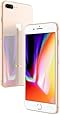
    iPhone 8 Plus
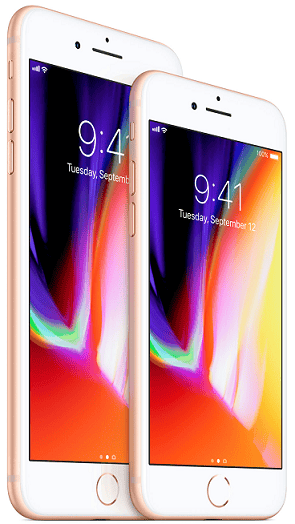
    The newly unveiled iPhone 8 Plus is the bigger sibling of Apple’s latest flagship iPhone 8. It shows off similar premium design and same powerful processor, but comes with dual-lens rear camera setup.

    Where to Buy iPhone 8 Plus

    Jumia Nigeria – See Offers | Konga – See Offers | Jumia Kenya – See Offers

    iPhone 8 Plus Key Specs & Features

    • 5.5-inch IPS Display, 1080 x 1920 pixels (401 ppi)
    • Apple A11 Bionic Chipset with GB RAM
    • iOS 11
    • Water Resistant & Dustproof
    • 64GB, or 256GB Built-in Storage
    • Dual 12MP Rear Camera and 7MP Front Camera
    • 4G LTE (up to 1024 Mbps download)
    • Fingerprint Sensor (Front)
    • Fast Charging and Wireless Charging support
    iPhone 8 Plus

    Design and Display

    Like its smaller brother, the iPhone 8 Plus flaunts a premium all-glass design. It is among the first phones from its American maker offering glass on the rear. This is probably the only thing on the outside that sets it apart from its predecessor. The company claims this glass is the most durable on any phone to date.
    The water and dust proof device crams in a large 5.5-inch Retina HD display. The IPS touch screen actually has a resolution of 1,920 x 1,080 pixels. That’s more than 400 pixels per inch. It comes with oleophobic coating.

    Camera

    The iPhone 8 Plus differs from the regular variant in the camera department. It offers you not one, but two 12MP sensors on the rear. The main wide-angle camera uses a six-element lens with an f/1.8 aperture. The second telephoto shooter has an aperture size of f/2.8.
    Camera features include phase detection autofocus (PDAF), 2X optical zoom, optical image stabilisation (OIS), and quad-LED dual tone flash. Apple promises better bokeh effect in shots. You get a 7MP front camera with Full HD video recording capability for selfies.

    Hardware, Software and Other Features

    A new in-house A11 Bionic chip provides the muscles to get things done in the iPhone 8 Plus. The six-core chipset offers better processing and graphics crunching, as one would expect. Support comes from 3 GB of RAM. Buyers can get the device in a 64GB or 256GB variant.
    The iPhone 8 Plus flagship comes with latest Apple iOS 11 operating system. The American tech company promises awesome augmented reality (AR) experience. Plus, audio is louder and bass deeper.
    You get speedy dual-band Wi-Fi 802.11 a/b/g/n/ac and Bluetooth 5.0 for wireless connectivity. There are NFC and Touch ID for Apple Pay and seamless unlocking. For the first time ever, Apple offers wireless charging support on a flagship smartphone. iPhone 8 Plus also supports fast charging.
    Shop Related Products
    Apple iPhone 8 64GB GSM Unlocked Sm…
    $519.95
     (46)
    Apple iPhone 8 Plus 5.5", 64 GB, GSM Unlocked, …
    $797.00$849.00
     (32)
    Apple iPhone 8 Plus 5.5", 64 GB, Fully Unlocked,…
    $689.00
     (11)

    iPhone 8 Plus Price and Availability

    Pre-orders for the iPhone 8 Plus began on September 15, 2017, while the device hit the stores starting September 22, 2017. iPhone 8 Plus is available in 64GB and 256GB models at $799 and $949 respectively.
    The iPhone 8 Plus is available in Nigeria, Kenya, or Ghana. You can by the extra-large smartphone at leading online stores in your country. iPhone 8 Plus Price in Nigeria ranges from 270,000 Naira to 550,000 Naira, depending on your location and built-in storage.
    Price in Ghana is expected to start at around 3,700 GH₵. iPhone 8 Plus Price in Kenya is expected to start at around 84,299 KSh.

    iPhone 8 Plus Price in Nigeria

    Below is a price breakdown of the iPhone 8 Plus in Nigeria. You can choose between the 64GB model and the 256GB model. Here are their price range below:
    • 64GB model – ₦270,000 to ₦350,000
    • 256GB model – ₦305,000 to ₦550,000

    iPhone 8 Plus Price in Kenya

    Below is iPhone 8 Plus price in Kenya. You can choose between the 64GB model and the 256GB model. Here are their price range below:
    • 64GB model – KSh 84,500 to KSh 105,000
    • 256GB model – KSh 105,500 to KSh 125,000
    • For latest prices, Click Here

    iPhone 8 Plus Price in Ghana

    Below is a price breakdown of the iPhone 8 Plus in Ghana. Here are their price range below:
    • 64GB model – 3,700 GH₵ to 4,000 GH₵
    • 256GB model – 5,490 GH₵ to 5,890 GH₵
    • For latest prices, Click Here

    Apple iPhone 8 Plus Specs

    Here are a few specs of the Apple iPhone 8 Plus:

    General Features

    • Platform: iOS 11
    • Processor: Apple A11 Bionic
    • GPU: –
    • Memory: 2GB RAM
    • Colours: Silver, Space Gray, Gold
    • Dimension: 158.4 x 78.1 x 7.5 mm
    • Weight: 202 g
    • SIM Type: Nano SIM
    • SIM Count: Single SIM

    Display

    • Display: 5.5-inch IPS Display, 1080 x 1920 pixels (401 ppi), 3D Touch
    • Screen Protection: Ion-strengthened glass, oleophobic coating

    Camera

    • Rear Camera: Dual 12MP Camera, 2160p ultra HD 4K Video
    • Rear Camera Features: phase detection autofocus, 2X Optical Zoom, quad-LED (dual tone) flash, Geo-tagging, simultaneous 4K video and 8MP image recording, touch focus, face/smile detection, HDR (photo/panorama), OIS
    • Front Camera: 7MP Camera, 1080p HD Video, HDR, Panorama

    Storage

    • Built-in Storage: 64GB or 256GB
    • Memory Card Support: No
    • Bundled Cloud Storage: –

    Network Support

    • 2G GSM: Yes
    • 2G CDMA 1X: Yes
    • 3G WCDMA: Yes
    • 3G CDMA EVDO: Yes
    • 4G LTE: Yes, 1(2100), 2(1900), 3(1800), 4(1700/2100), 5(850), 7(2600), 8(900), 12(700), 13(700), 17(700), 18(800), 19(800), 20(800), 25(1900), 26(850), 28(700), 29(700), 30(2300), 34(2000), 38(2600), 39(1900), 40(2300), 41(2500), 66(1700/2100)

    Internet & Connectivity

    • GPRS: Yes
    • EDGE: Yes
    • 3G/WCDMA/HSPA: Yes
    • HSPA+: Yes
    • CDMA EVDO: Yes
    • 4G LTE: Yes, up to 1024 Mbps
    • WLAN: Yes, Wi-Fi 802.11 a/b/g/n/ac, dual-band
    • Wi-Fi Hotspot: Yes
    • Bluetooth: Yes Bluetooth 5.0, A2DP, LE
    • NFC: Yes, (Apply Pay only)
    • Infrared Blaster: –
    • USB Port: Yes USB 2.0, Reversible Connector

    Messaging

    • SMS/MMS: Yes
    • Instant Messaging: Yes
    • Push Emails: Yes
    • Email Protocol: –

    Entertainment

    • Music Player: Yes
    • Video Player: Yes
    • FM Radio: No
    • Loudspeaker: Yes
    • 3.5mm Jack: No (supports a lightning connector to 3.5mm jack adapter or wireless AirPods)

    Navigation

    • Navigation: Yes, with A-GPS, GLONASS, GALILEO
    • Maps: Apple Maps

    Sensors & Control

    • Digital Compass: Yes
    • Accelerometer: Yes
    • Proximity Sensor: Yes
    • Light Sensor: No
    • Barometer: Yes
    • SpO2: No
    • Pedometer: No
    • Heart Rate Monitor: No
    • Gyroscope: Yes
    • Fingerprint Scanner: Yes
    • Iris Scanner: No
    • Intelligent Digital Assistant: Yes
    • Motion Sensing / Gesture Control: No
    • Voice Control: Yes

    Other Features

    • Video Streaming: Yes
    • Active Noise Cancellation: Yes
    • Wireless Charging: Yes
    • Built-in Mobile Payment: Yes, Apple Pay
    • Water Resistant: Yes, IP67 (Water resistant in up to 1 meter or water for up to 30 minutes)
    • Dust Resistant: Yes
    • Image Editor: Yes
    • Video Editor: Yes
    • Document Viewer: No
    • Document Editor: Yes

    Battery

    • Battery: Non-Removable Battery Battery
    • Talktime: up to 21 hours (3G)
    • Standby Time: –

    Download Android Pie 9.0 firmware for MECOOL KM9 TV Box

    Download Android Pie 9.0 firmware for MECOOL KM9 TV Box Posted in Mar 3, 2019 in Firmwares , 1 comment This firmware is for MECOOL K...